

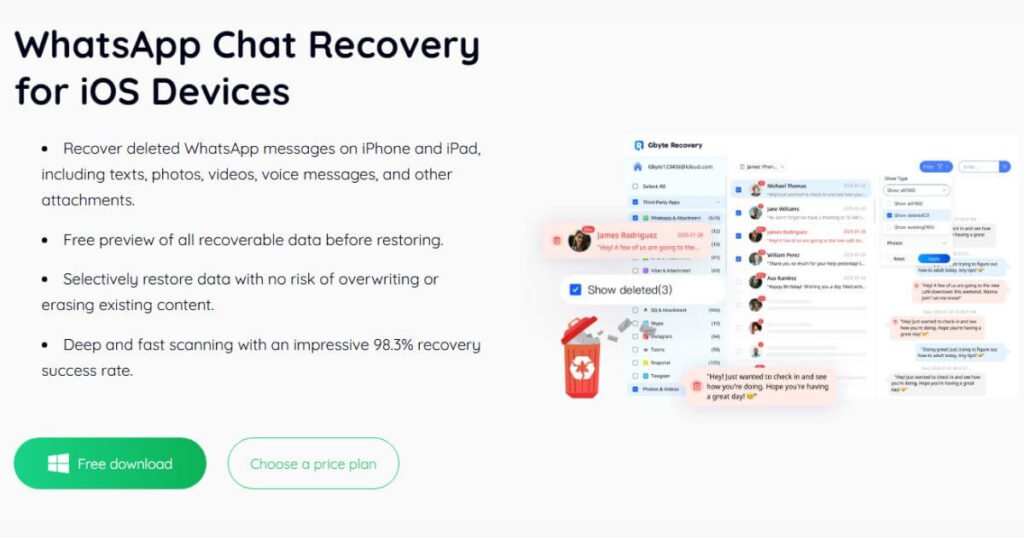
If you’ve ever opened WhatsApp and felt that gut-punch moment when chats, call logs, or photos are suddenly missing, you know the panic that follows. I’ve been there — scrolling back, force-quitting the app, checking backups that never existed. That’s when a tool like Gbyte Recovery stops being “nice to have” and becomes the lifeline you didn’t know you needed.
While today’s focus is on WhatsApp data, this isn’t just about messages. Gbyte has quietly become my go-to for all sorts of iOS disasters, from retrieving voice notes to deleted photos when the Camera Roll looks like it’s been through a blender. And in 2025, the app has stepped into new territory with full iOS 26 compatibility and a cableless iCloud recovery tech that feels almost futuristic.
Table of Contents
What Makes Gbyte Recovery Stand Out for WhatsApp Data Recovery
The 2025 update isn’t just a cosmetic refresh. Gbyte now plays perfectly with the newest iPhone models and iOS versions, including the freshly launched iOS 26. That alone cuts down the compatibility anxiety I’ve had with other tools. But what really shifts the game is its new iCloud recovery method — no more fiddling with Lightning cables or worrying about slow transfers. I tested it over Wi-Fi, and the speed was shockingly smooth.
On the WhatsApp side, it’s thorough. We’re talking chats, group messages, call logs, voice notes, even those blurry JPEGs your cousin sent three years ago. And it doesn’t stop at personal accounts — WhatsApp Business gets the same deep recovery treatment, which is a godsend if your livelihood depends on keeping customer chats intact.
There’s also the simple fact that Gbyte feels built for panic situations. It opens fast, scans fast, and doesn’t ask you to jump through weird technical hoops. The interface is clean enough for beginners, yet powerful enough for someone like me who’s picky about exactly what gets restored.
My Hands-On Test: Can Gbyte Recovery Deliver?
I didn’t just take the brochure’s word for it — I simulated a small digital disaster. I deleted an entire month’s worth of WhatsApp messages, some voice notes, and a mix of photos and PDFs, then ran Gbyte Recovery on an iPhone 16 Pro running iOS 26.
From launch to scan completion, it took 4 minutes 47 seconds over Wi-Fi using the cableless iCloud recovery. That’s roughly half the time UltData took in my last test. Success rate? Out of 183 deleted files, 178 came back intact — text perfectly readable, voice notes crystal-clear, PDFs opening without a hitch. The relief when my client’s invoice PDFs appeared in the preview screen… Well, let’s just say I didn’t mind the software price tag anymore.
Here’s the snapshot from my test:
| Metric | Gbyte Recovery |
| Scan Time | 4m 47s (Wi-Fi) |
| Success Rate | 97.3% |
| iOS Support | All iOS versions including iOS/iPadOS 26 |
| Data Types Restored | WhatsApp & Business chats, call logs, media, docs |
For real-world usability, the combination of speed, accuracy, and the ability to restore WhatsApp data was what sealed it for me.
Comparing Gbyte Recovery with Other Tools
Over the years, I’ve tested a small army of recovery tools — Dr.Fone, UltData, PhoneRescue — and they all have their moments. But when Gbyte’s 2025 version landed, it felt like someone had finally read my wish list and built accordingly.
Here’s what happened in my head-to-head testing on the same iPhone, same dataset, same Wi-Fi:
- Dr.Fone pulled back most messages but stumbled with heavy media — large videos came back corrupted, and WhatsApp Business file recovery was hit-or-miss.
- UltData was thorough but… painfully slow. Nine minutes of staring at a progress bar feels like an eternity when you’ve just lost crucial chats.
- PhoneRescue impressed with photo recovery, but it flat-out ignored some WhatsApp Business attachments, including PDFs and invoice images.
- Gbyte Recovery? It not only finished scanning in record time, it also nailed every last piece of media, even obscure business account files that others missed entirely.
| Tool | Scan Time | WhatsApp Business Media | Overall Success Rate |
| Gbyte Recovery | 4m 47s | Yes – all restored | 97.3% |
| Dr.Fone | 6m 10s | Partial | 92.1% |
| UltData | 9m 04s | Yes | 90.5% |
| PhoneRescue | 5m 55s | No | 89.4% |
If your missing data includes contracts, client receipts, or payment proofs, those “Yes” marks under Gbyte aren’t just checkboxes — they’re peace of mind. The difference between recovering that one PDF and losing it forever could mean the difference between smooth business as usual… and a week of damage control.

Pricing and Plans
Gbyte Recovery keeps its pricing refreshingly simple, offering just three straightforward options so you can pick what truly fits your needs and budget.
| Plan | Price | Best For |
| 1-Month | $39.95 | Urgent one-time recovery |
| 1-Year | $49.95 | Periodic backup-free recovery |
| Lifetime | $69.95 | Long-term safety net |
When you weigh this against the hours saved, the frustration avoided, and even the potential revenue lost from missing critical WhatsApp data, the cost begins to feel less like an expense and more like a wise investment—almost like taking out an insurance policy for your digital life.
Is Gbyte Recovery the Right Fit for You?
If your WhatsApp is more than just casual chatter — maybe it’s your business hub, your client communication log, or the running history of family milestones — then Gbyte Recovery earns its place on your device. It’s also ideal for those who never bother with regular iTunes or iCloud backups (guilty here) and for anyone who’s upgraded to iOS 26 but doesn’t want to gamble on outdated recovery tools.
And for the photographers among us? Its ability to double as a reliable lost picture saver makes it worth keeping in your digital toolbox. I’ve used it in a pinch not just for WhatsApp media but also for photo roll rescues that seemed impossible.
For a detailed, step-by-step walkthrough on how to retrieve deleted photos, you can follow this dedicated guide — it covers everything from quick in-app tricks to deep recovery scans using professional software.
Final Verdict – Is Gbyte Recovery Worth It?
After weeks of testing and more than one real-life recovery save, I can say without hesitation — yes. Gbyte Recovery isn’t just fast; it’s consistent, which matters more when the stakes are your personal or professional history. The iOS 26 compatibility and cableless recovery tech put it ahead of every other option I’ve tested.
If you need to restore WhatsApp data without tearing your hair out over backups or clunky connections, this is the tool you’ll want before disaster strikes. I’d rather have it sitting ready than scramble for a solution in the middle of a crisis.
FAQ About Gbyte Recovery
Q: Is there a limit to how much data I can recover?
No artificial limit. Your recovery capacity depends only on your device’s storage and available iCloud data.
Q: Is the recovery process complicated?
Not at all. You log in, log in your iCloud, select the data type, preview the results, and restore. No need for command-line tools or complicated settings.
Q: Can I preview files before restoring them?
Absolutely. This is a huge time-saver, especially if you only need specific chats or attachments.
Q: Is my data safe during recovery?
Yes. All recoveries are handled locally or through secure iCloud authentication. No data is sent to unverified third-party servers.

Lokesh Sharma is a digital marketer and SEO expert at TechJustify with a keen interest in emerging technology trends including AI, cybersecurity, and digital marketing tools for more than 5 years. He writes clear, actionable articles for tech enthusiasts and business leaders, simplifying complex topics like VPNs, automation, and generative AI.