

If you’re still using Windows 7 and want a fast, lightweight, and feature rich photo viewer, you’ve probably noticed that the default Windows Photo Viewer is outdated. Many users look for better alternatives that support multiple formats, offer editing tools, and run smoothly without slowing down their PC.
Best Photo Viewer for Windows 7 – Here are 9 of the best software to view photos or images version of Windows 7. As we know, Windows already provides features to view image formats such as Windows photo viewer, but Windows Photo Viewer does not yet have many features to view other image formats.
For those of you who are looking for software to view photos or images, you may be able to use one of the free image viewers like prints4sure.com below, all of which can be used under the Windows OS.
Looking for a lightweight, powerful image viewer for Windows 7? Here’s an updated breakdown with user-friendly, feature-rich (and even pro-level) options:
Table of Contents
Best Photo Viewer for Windows 7: Expanded List 2025
- FastStone Image Viewer – Feature-rich, intuitive UI, batch tools
- IrfanView – Lightweight, fast, broad format support
- XnView – Easy-to-use modern interface, multi-format compatible
- Zoner Photo Studio X – Full editing suite (RAW, tagging, galleries)
- FastPictureViewer – Ideal for photographers needing speed and RAW handling
| Photo Viewer | Strengths | Best For |
|---|---|---|
| ACDSee Photo Studio | Format support, online sharing, slideshows | Users wanting slide presentations & ease |
| Picasa | Lightweight, transparency effects, legacy support | Nostalgic users or basic clustering needs |
| FastStone Image Viewer | Batch editing, converters, full-screen intuitive features | Everyday users needing robust functionality |
| XnView | Fast, precise rendering, easy setup | Users needing high format support |
| Wildbit Viewer | EXIF/TIFF/JPEG metadata support, organized layout | Users managing large, metadata-rich libraries |
| KuViewer | Minimal, lightweight, straightforward file management | Users who want no-frills, fast viewing |
| IrfanView | Tiny, fast, robust format and batch features | Users on older PCs needing speed + compatibility |
| FastPictureViewer | Photographers’ tool: RAW, ICC profiles, multi-monitor | Pro photographers or power users |
| Zoner Photo Studio X | Advanced editing, tagging, automation, export tools | Photographers needing an all-in-one editor |
| Adobe Bridge | Rich metadata management, Creative Cloud integration | Designers/Creative Cloud users wanting asset control |
Best Photo Viewer for Windows 7
ACDSee Photo Studio Software
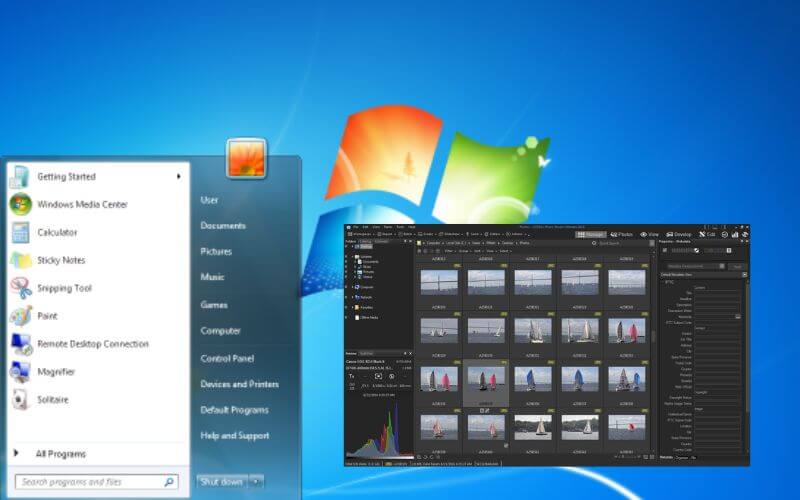
ACDSee Photo Studio Software – This is the first best software to view photos or images version of Photo software
That saves so much time and is more flexible and very simple to use. Equipped with support for so many image formats, ACDSee can also be used to share your photos online, making quality prints.
ACDSee also comes with Flash and PDF slideshows. What Techjustify likes about this app is how to view other images/change images by simply scrolling the mouse.
Download ACDSee 14.3.168 For the Key
Picasa
Picasa is the second best software to view photos version of Techjustify Blog, Picasa was actually created by Idealab but is now owned by Google. In July 2004, Google acquired Picasa and made it free to download.
This application runs on Windows XP, Windows Vista, Linux, and Mac OS X which can be downloaded via Google Labs. For Windows 98 and Windows ME, only older versions are available. According to
the advantage of Picasa is that it can see images with a transparent effect.
FastStone Image Viewer
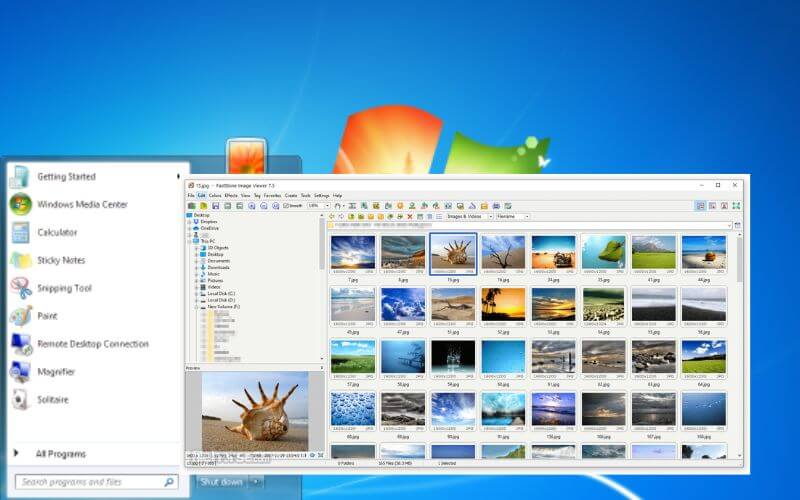
Image Viewer FastStone is a free software image viewer without a license key. It is more appropriate to use it to help when you want to see image files with clearer colors.
This image viewer is rich in features that are quite friendly complete with converters and editors. Viewing and organizing photos using this freeware file is so easy and simple. With the intuitive full screen mode, you can quickly access information. The advantage of this software according to
Techjustify is because its use is the same as Acdsee, namely replacing the next image button with a mouse scroll.
Download FastStone Image Viewer
XnView
XnView is a free image viewer that will help you to view images easily with clarity and precision on the desktop. You can also set it up quickly.
You can import various types of graphic file formats and provide a precise and comprehensive viewer so that you can view the details of the image at any time with ease. This photo viewer is totally free of cost or free without a serial key.
Wildbit Viewer
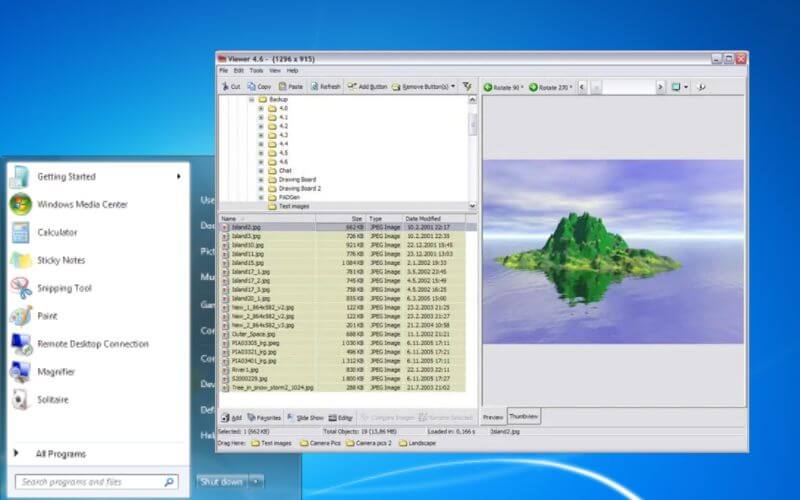
Wildbit Viewer is another free image viewer which helps you to view images in an organized way. The technique was developed to offer the best of features which can be very useful when you have a relatively large database of image files to view.
This photo viewer is developed with advanced technology which will let you have image info with EXIF Image Meta data JPEG and TIFF support and like Photoshop file info from JPEG and TIFF.
KuViewer
Kujawiak Viewer (kuview) is a free and lightweight photo viewer, which can help you to browse images and organize files. This application is easy to use and easy to operate.
Read Also: 7 Best Photo Viewers For Windows 11
12+ Free Celebrity Photo Editing Apps
You can also organize photos easily using the image viewer’s intuitive file management features to copy, move, delete and rename files and folders. The shell integration function added to Windows will allow you to use it directly to open new image files.
IrfanView

IrfanView is a little software that runs quickly even on outdated or underpowered PCs. It offers an easy-to-use interface that makes it simple to explore and carry out fundamental editing activities. A broad variety of image formats are supported by the programme, including well-known ones like JPG, PNG, and GIF as well as uncommon ones like TIFF and BMP.
IrfanView is the seven Software on the list of 9 Best Software For Viewing Photos in windows 7 by the Techjustify version of this blog, which is free software and very simple. You can use it as a graphic viewer for Windows 9x, ME, NT, 2000, XP, 2003, 2008, Vista, and Windows 7.
Additionally, IrfanView features a number of editing capabilities, including the ability to crop, resize, and rotate pictures. Additionally, it offers more sophisticated capabilities like batch processing support, image effects, and colour tweaks. Users can convert images between multiple formats with the program’s built-in image converter.
FastPictureViewer
A professional-grade photo viewer that is quick, responsive, and effective is called FastPictureViewer. It is the perfect option for both professional and amateur photographers because it is optimised for presenting high-resolution photographs swiftly and seamlessly. FastPictureViewer enables you to see and edit image metadata, apply colour correction, and support for ICC profiles.
It also supports all popular image formats, including RAW files. You can swiftly browse through your photographs thanks to customised keyboard shortcuts and mouse wheel gestures. Additionally, full-screen mode on the second monitor and dual-monitor setups are supported. Basic editing features like cropping, resizing, and colour correction are also included in the software.
Zoner Photo Studio X
A professional-grade photo reader and editor made specifically for photographers is called Zoner Photo Studio X. Numerous editing options are available, such as lens correction, exposure adjustment, and colour correction. Additionally, it has sophisticated capabilities like a virtual copy that let you save several copies of a picture.
One of Zoner Photo Studio X’s distinctive qualities is its capacity to handle a variety of picture formats, including RAW files from DSLR cameras. Additionally, it has a built-in RAW processing engine that makes it simple to edit and convert RAW data.
Additional organisational options in the programme include tagging, updating of the metadata, and geotagging. Additionally, a versioning system that lets you trace several iterations of a picture is included into the programme.
You can simply share your images on social media, as well as make photo albums, slideshows, and print layouts, with the help of the export options offered by Zoner Photo Studio X. You may share your images on the web via the integrated web gallery that is also included.
The programme also comes with a variety of automation options including batch processing, which lets you apply the same editing or conversion settings to several photographs at once.
Adobe Bridge
To organize and manage their digital assets, photographers, designers, and other creative professionals can use Adobe Bridge, a potent multimedia management application. It is a part of Adobe Creative Cloud that is free to use and provides a wealth of capabilities to aid users in effectively managing and organising their multimedia files.
Users may swiftly search through their files using the built-in file explorer to locate the particular picture, video, or audio item they require. Additionally, Adobe Bridge enables users to categorise their files into folders, tags, and metadata, making it simple to search, sort, and filter across sizable file collections.
A built-in RAW processing engine and compatibility for a large number of picture formats are only two of its extensive editing and processing features.
Conclusion
there are many photo viewers for Windows 7 that provide a variety of capabilities to aid users in effectively managing and organizing their digital assets. The top options include Zoner Photo Studio X, Adobe Bridge, Fastpictureviewer, IrfanView, and Fastpictureviewer. The ideal photo viewer for you will rely on your individual requirements and tastes.
Each of these photo viewers offers a distinct set of features and capabilities. Choosing a photo viewer for Windows 7 ultimately comes down to taking your individual requirements and tastes into account. It’s a good idea to test out a few different options to see which one suits you the best.
Which Windows 7 photo viewer is fastest?
IrfanView, FastStone, and KuViewer are the speediest due to lightweight design and efficient performance.
Any option with RAW editing and batch tools?
FastPictureViewer, Zoner Photo Studio X, and Adobe Bridge handle RAW formats, metadata editing, and batch processes.
Do any of these support slideshows and easy file sharing?
ACDSee has Flash/PDF slideshows and online sharing. Zoner includes web gallery tools, while FastStone offers intuitive slideshow modes.
What is the best free photo viewer for Windows 7?
IrfanView and FastStone Image Viewer are the best free options. Both are lightweight, fast, and support dozens of image formats.
Do these photo viewers support RAW images?
Yes. FastStone Image Viewer, FastPictureViewer, and Zoner Photo Studio X support RAW formats, making them ideal for photographers.
Is there a modern replacement for Windows Photo Viewer?
Yes. XnView MP and nomacs are modern alternatives with better UI, batch processing, and multi-format support.
Can I still use Picasa on Windows 7?
Yes, Picasa still works on Windows 7, but it’s discontinued by Google and no longer receives updates or support.
Which photo viewer is lightweight and minimal?
KuViewer and JPEGView are extremely lightweight, minimalistic, and ideal for older PCs running Windows 7.

Pradeep Sharma is a author the mind behind Techjustify, where I craft insightful blogs on technology, digital tools, gaming, AI, and beyond. With years of experience in digital marketing and a passion for tech innovation, I aim to simplify complex topics for readers worldwide.
My mission is to empower individuals with practical knowledge and up-to-date insights, helping them make informed decisions in the ever-evolving digital landscape.